
What is Hyperliquid hLP?
Hyperliquid Hyperliquidity Provider (hLP) is a protocol vault that aggregates user capital to provide liquidity on the Hyperliquid exchange. Unlike a standard staking position, hLP functions as an automated market maker. The vault earns yield primarily through trading fees generated by the high volume of activity on the exchange.
The vault employs multiple market-making strategies to maintain deep liquidity across perpetual futures pairs. In return for providing this capital, hLP participants receive a share of the fees collected from traders. Additionally, the vault performs liquidations, capturing the liquidation penalties when leveraged positions are forcibly closed.
This structure makes hLP the primary yield vehicle on the platform. Instead of earning passive interest, your capital is actively working to facilitate trades. The yield is variable and depends directly on market volatility and trading volume. When the market is active, fee income increases; when activity slows, yields typically contract.
The vault is transparent and auditable. You can track the vault's performance, fee income, and exposure in real time through official documentation and third-party trackers like DefiLlama. This visibility allows you to assess the risk and reward profile before depositing funds.
Fund Your Hyperliquid Wallet
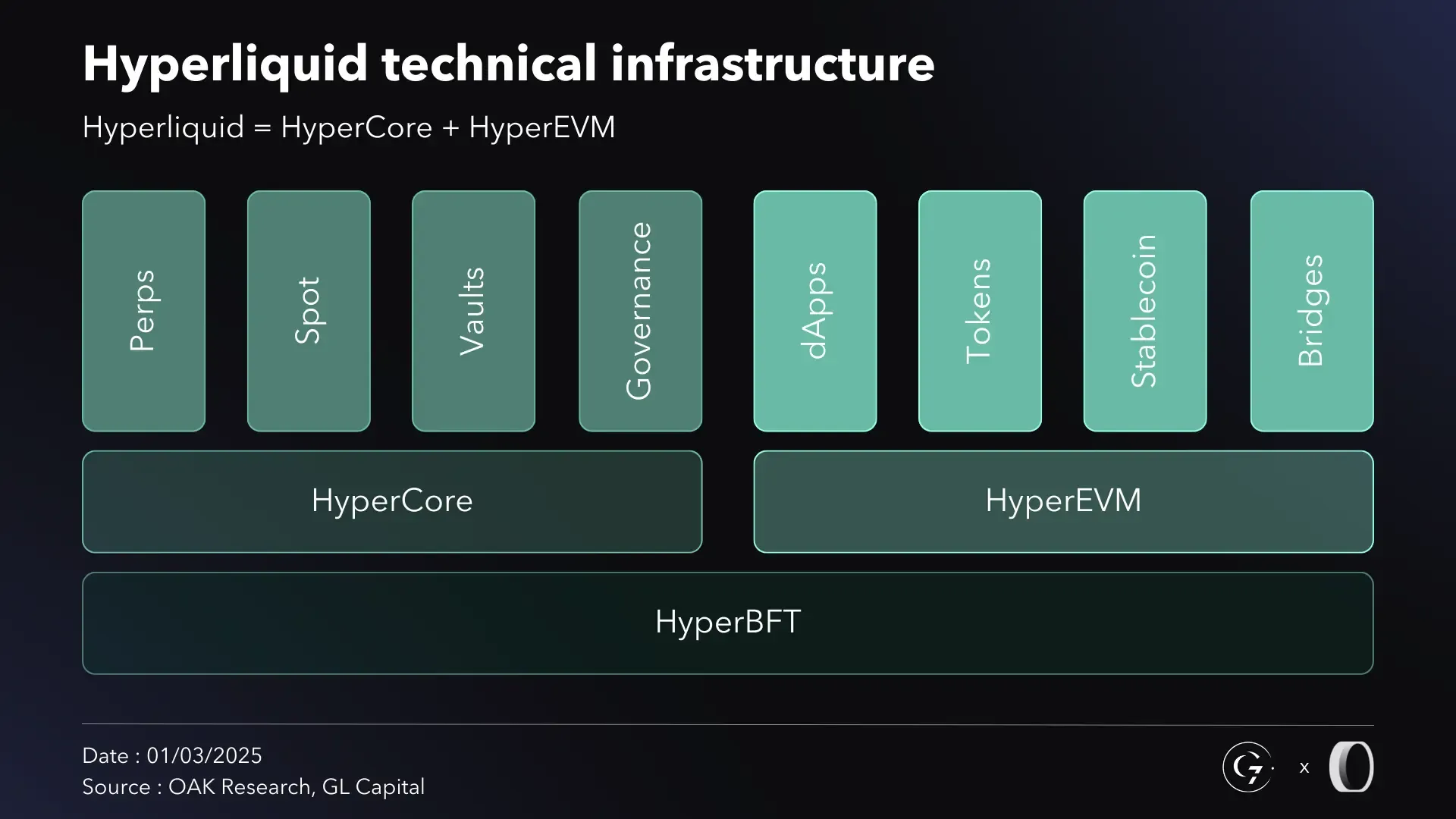
To deposit into Hyperliquid hLP, you need USDC or HYPE on the HyperEVM chain. Unlike the main Hyperliquid L1, the HyperEVM is an EVM-compatible environment that handles the actual yield-bearing positions. You cannot deposit directly from a standard Ethereum or BSC wallet address; you must use the HyperEVM address associated with your wallet.
You can fund this address in two ways: bridging assets from another chain or withdrawing from a centralized exchange (CEX) that supports HyperEVM withdrawals. Bridging is ideal if you already hold assets on chains like Ethereum, Arbitrum, or Base. CEX withdrawals are often faster if you already hold USDC or HYPE on platforms like Binance or Coinbase.
Choose Your Funding Method
If you bridge, use the official Hyperliquid Bridge or a trusted third-party bridge like Stargate. Select the source chain (e.g., Ethereum) and the destination chain (HyperEVM). Ensure you are sending USDC or HYPE. Check the bridge’s supported tokens list to avoid sending unsupported assets.
If you withdraw from a CEX, navigate to the withdrawal section. Select USDC or HYPE. Choose the HyperEVM network. Enter your HyperEVM address. Double-check the network selection; sending to the wrong network can result in lost funds. Confirm the withdrawal.
Verify Your HyperEVM Address
Before sending any funds, verify your HyperEVM address. Open your wallet (e.g., MetaMask). Add the HyperEVM network if it is not already present. You can find the network details on the Hyperliquid docs. Copy the address displayed in your wallet. This is the address you will use for deposits and hLP interactions.
Send Your Funds
Initiate the transfer from your source (bridge or CEX). Paste your HyperEVM address as the recipient. For bridging, confirm the transaction in your wallet. For CEX withdrawals, confirm the withdrawal after any security checks. Wait for the transaction to confirm. HyperEVM blocks are fast, so funds should appear in your wallet within minutes.
Once the funds arrive, you can proceed to deposit them into the hLP vault. Remember that only USDC and HYPE are accepted for hLP deposits. Other assets must be swapped first.
-
Verify your HyperEVM address is correct
-
Confirm you are sending USDC or HYPE
-
Select HyperEVM network for CEX withdrawals or correct source chain for bridging
-
Wait for confirmation before proceeding to deposit
Navigate to the Vaults Page
Head to app.hyperliquid.xyz/vaults to access the dedicated interface for managing hLP positions. This page serves as the central hub for all vault activities, allowing you to deposit, withdraw, and monitor performance without navigating through complex trading menus.
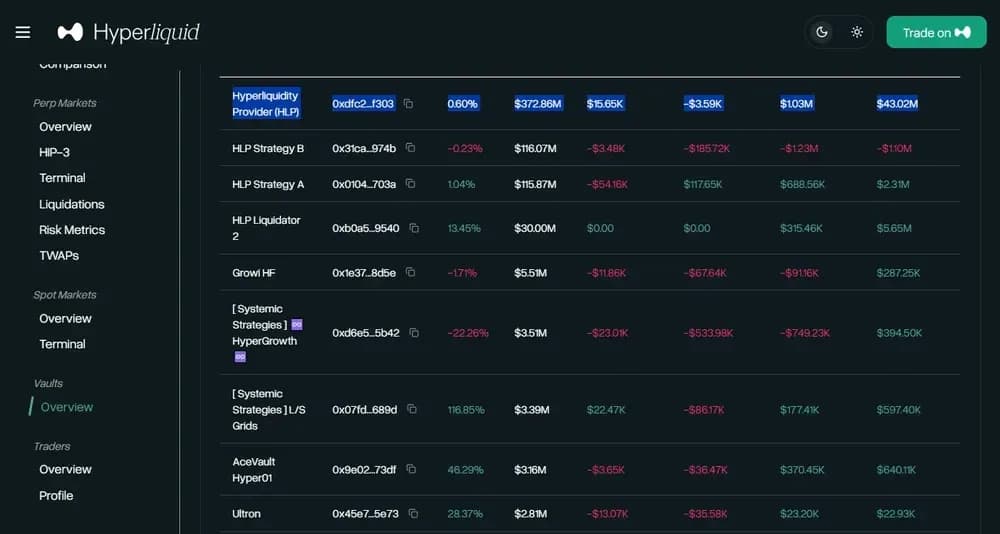
The interface displays a list of available vaults, including the Hyperliquid Yield (hLP) vault. Look for the vault labeled "hLP" or "Hyperliquid Yield" in the primary list. Each entry shows current metrics such as the APY and total value locked, giving you a snapshot of the vault's health before you commit funds.
Once you locate the hLP vault row, click the "Deposit" button to initiate the funding process. This action will open a modal where you can select the amount of USDC to deposit and confirm the transaction via your connected wallet. Ensure you are on the correct vault to avoid accidental deposits into other strategies.

Deposit assets into the hLP vault
Depositing into the Hyperliquid Liquidity Provider (hLP) vault converts your assets into LP tokens, which serve as your proof of ownership and stake in the vault’s liquidity pool. This process is not a simple storage action; it is an active commitment of capital to the protocol’s market-making strategies. Once deposited, your funds are automatically compounded, meaning the vault reinvests trading fees and funding rate income back into the pool to grow your position over time.
Follow these steps to execute the deposit transaction on the Hyperliquid interface.

Navigate to the Hyperliquid app and connect your preferred Web3 wallet. Ensure you are on the correct network (Arbitrum One) and have sufficient native gas tokens (ETH) to cover transaction fees. The interface should display your current wallet balance and any existing positions.

Locate the "Vaults" or "hLP" tab in the main navigation menu. Click on the Hyperliquid Liquidity Provider (hLP) vault card. This dashboard displays real-time metrics including the current APY, total value locked (TVL), and your existing hLP token balance if you have previously deposited.
Input the amount of assets you wish to deposit. You can typically choose from supported assets like USDC or ETH. The interface will calculate the equivalent number of hLP tokens you will receive based on the current vault ratio. Review the estimated gas fees and slippage tolerance before proceeding.
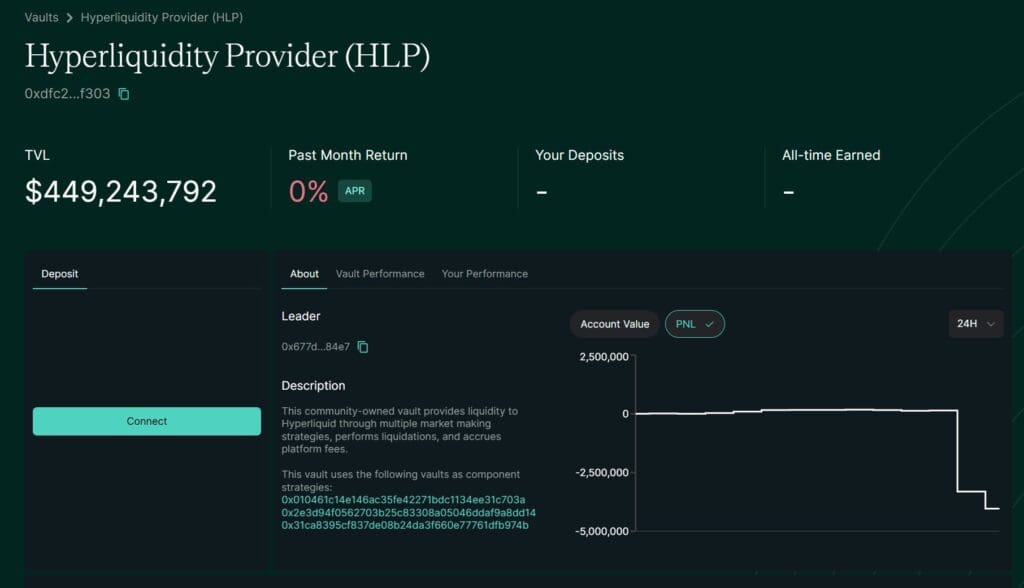
Click the "Deposit" button to initiate the transaction. Your wallet will prompt you to sign the message and confirm the on-chain transfer. Once the transaction is confirmed on the blockchain, your assets will be locked in the vault, and your hLP token balance will update in your wallet.
The hLP vault operates as a self-sustaining liquidity engine. Unlike traditional staking where you manually claim rewards, the vault’s auto-compounding mechanism continuously reinvests earnings. This reduces the need for active management but requires you to trust the underlying smart contract and the vault’s risk parameters. Always verify the vault’s health metrics, such as drawdown history and leverage usage, before committing significant capital.
Monitor Fees and TVL Metrics
Track the protocol’s performance to understand the source of your yield. Hyperliquid hLP generates revenue from trading fees and liquidations. These metrics appear on DefiLlama and reflect the vault’s real-time activity.
Visit the Hyperliquid HLP page on DefiLlama. Look for the "Fees" and "Revenue" tabs. Fees represent the total trading volume processed by the vault. Revenue is the portion kept by the vault after operational costs. This revenue is what distributes yield to hLP holders.
Check the TVL (Total Value Locked) to gauge vault size. A growing TVL often signals increased confidence, but it also means profits are spread across more shares. Watch for sudden drops in TVL, which may indicate large withdrawals or market stress.
Manage impermanent loss risk
Impermanent loss is the primary risk when depositing into Hyperliquid hLP. Because the vault holds volatile assets like BTC and ETH, price swings can erode the value of your deposit compared to simply holding those assets in your wallet. This happens when the price ratio of the assets in the vault changes significantly from the time you deposited.
To mitigate this risk, you need to understand how the vault rebalances. The hLP vault automatically adjusts its asset weights to maintain a balanced exposure. However, during high volatility, this rebalancing can result in selling assets that are rising and buying assets that are falling, locking in losses relative to a hold strategy.
The most effective way to manage this risk is to monitor the vault's performance relative to a simple buy-and-hold strategy. If the impermanent loss exceeds the trading fees you are earning, it may be time to withdraw. Keep an eye on the vault's TVL and fee generation metrics to gauge whether the yield is compensating for the risk you are taking.
Withdraw Your hLP Position
Closing your Hyperliquid hLP position is straightforward, but timing matters. Unlike traditional bank withdrawals, crypto exits happen on-chain, meaning they are instant once processed but depend on current market liquidity.
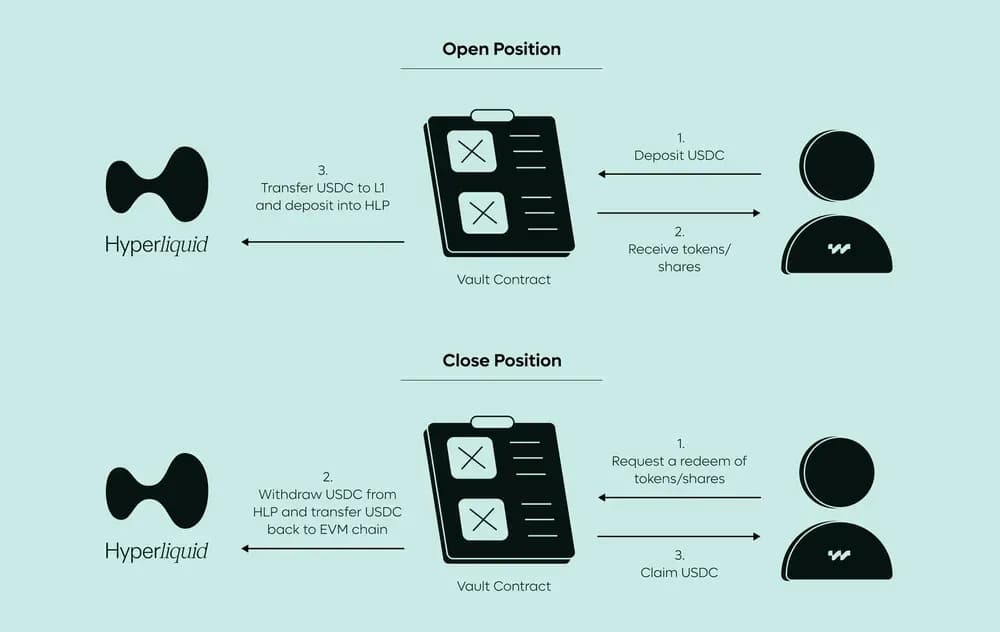
Open the Hyperliquid app and navigate to the Vaults section. Find your active hLP position in your portfolio list to verify the current balance and accrued yield.
Click the "Exit" or "Close" button associated with your hLP position. Confirm the transaction details in the pop-up window. This action initiates the redemption of your LP tokens back into the underlying assets.
The transaction is processed on the Arbitrum blockchain. Once confirmed, the underlying assets (typically USDC or the specific vault asset) are returned to your Hyperliquid wallet. You can then withdraw these funds to your external wallet if desired.
While the process is automated, always check the vault's current liquidity status before exiting during high-volatility periods to ensure smooth settlement.
Common hlp: what to check next
Understanding how Hyperliquid handles your assets and fees helps you manage risk and expectations. hLP operates as a non-custodial protocol vault, meaning your funds remain on-chain under your control while contributing to liquidity provision.
Who holds my funds?
Hyperliquid does not hold your assets in a centralized wallet. Your deposits go directly into the HLP protocol vault on the blockchain. This means you retain custody of your capital, though it is deployed into market-making strategies that carry smart contract risk.
What are the fees and minimums?
There are no deposit fees for adding liquidity to hLP. However, the protocol charges a small fee on the underlying trades executed by the vault. These fees are reinvested into the vault, increasing the value of your hLP tokens over time. There is no fixed minimum deposit; you can deposit any amount supported by the chain’s transaction limits.
How are yields distributed?
Yields come from trading fees generated by the vault’s market-making activity. Instead of periodic payouts, the yield accrues automatically. As the vault’s total value increases, the exchange rate between hLP and the underlying assets (like USDC) improves. You realize this yield when you withdraw your liquidity.
No comments yet. Be the first to share your thoughts!